
Wireshark Packet Analysis: Packet Rate and Protocol Hierarchy Review for RUCKUS AP Packet Captures
Summary
This article explains how to use Wireshark to perform a quick analysis of packet captures collected from a mirrored switch port connected to a RUCKUS Access Point (AP). It describes how to determine packets per second (PPS) and review protocol distribution using Wireshark statistics tools.Question
How can I use Wireshark to determine packets per second (PPS) and analyze protocol distributio
Customer Environment
RUCKUS Access Point (AP) Switch port mirroring (SPAN) Wireshark packet captures Wired or wireless traffic analysisResolution
Use Wireshark statistics to obtain a quick overview of traffic volume and protocol composition observed by the RUCKUS AP.
Review Packet Rate
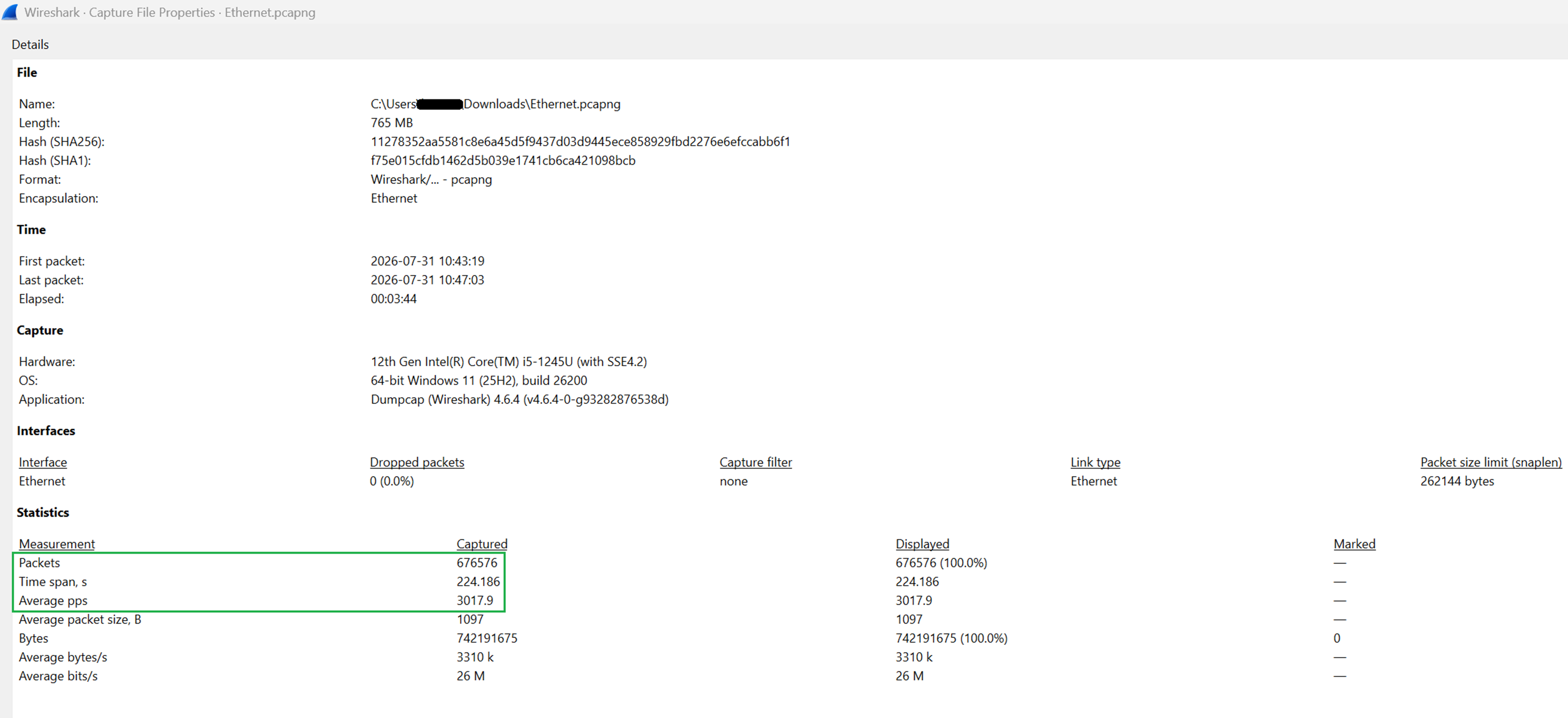
Navigate to: Statistics > Capture File Properties
The Summary window displays key capture statistics, including:
- Total packets captured
- Time span
- Average packets per second (PPS)
Review the Average pps value to understand the packet rate observed during the capture period.
Analyze Protocol Distribution
Navigate to: Statistics > Protocol Hierarchy
The Protocol Hierarchy view displays the packet and byte counts, along with their corresponding percentages, for each protocol across the different protocol layers.
In the example shown, IPv6 traffic represents a very small percentage of the total packets observed.
The majority of the traffic consists of IPv4 UDP traffic, This indicates that most packets observed by the AP are UDP-based.
Protocol Hierarchy statistics can help identify dominant traffic types and determine whether a specific protocol is contributing significantly to the overall traffic load.
Notes
- Ensure the packet capture was collected from a valid switch mirror (SPAN) port or AP Ethernet interface.
- Verify the AP Ethernet interface is negotiating at the expected speed (1 Gbps in the example) so that the statistics accurately represent the traffic seen by the AP.
- Packet rate should be evaluated together with packet size and overall throughput; packet count alone does not indicate whether traffic levels are excessive.
- Correlate Wireshark findings with AP, switch, or controller statistics when performing deeper traffic investigations.
Article Number:
000003575
Updated:
August 04, 2026 11:43 PM (about 1 month ago)
Tags:
Troubleshooting, ZoneDirector, ZoneFlex Indoor, ZoneFlex Outdoor, Performance, SmartCell Gateway
Votes:
1
This article is:
helpful
not helpful
Working...Please wait
This is here to prevent you from accidentally submitting twice.
The page will automatically refresh.